Please free MySQL from the evil clutches of Oracle.
Love,
The Schmitzer
Showing posts with label Development. Show all posts
Showing posts with label Development. Show all posts
Monday, April 20, 2009


Wednesday, July 9, 2008
Smart SVN
I've been using a great tool for Subversion called SmartSVN from Syntevo. If you are a Tortoise user, you should evaluate SmartSVN.
I'm generally a user of the SVN command line client (in cygwin, of course), but it is severely limited in its diff capability. This is exactly where Smart SVN excells.
Smart SVN is a java app for Subversion, rather than integrate with (and sufficiently slow down) Windows Explorer. It reads the working copy that you select, and shows the equivalent of an svn stat command.
When you double-click on a changed file, the file compare window appears, and it is a thing of beauty. This window shows a true mapping between the two versions of the file. The center section shows how the changes map into the other file. This shows the insertion point for new lines (greeen), the deletion point for deleted lines(blue), and the mapping for changed lines (red).
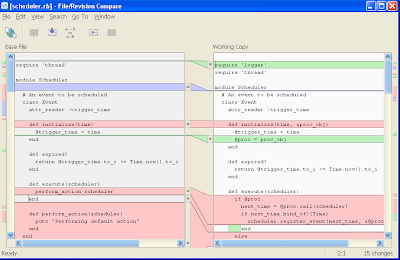
One interesting point is that the file compare window considers a single line replaced with many lines as a change, rather than an insert. This is semantically correct, it makes a it easier on your eyes browsing differences, when compared to a line change combined with an insert.
The other natural featuers are included, like undoing any of these changes in the compare window, editing directly within the working copy, and visual cues of where differences occur in the file.
The feature which puts a smile on my face every time I remember it is the differential scrolling. When you scroll using the mouse wheel, the two windows scroll at independent rates. This is to keep the related differences visible together. Just beautiful.
The bad news - version 4 plans to have Explorer integration! No thanks!
Do you use SmartSVN? Post your comment here.
I'm generally a user of the SVN command line client (in cygwin, of course), but it is severely limited in its diff capability. This is exactly where Smart SVN excells.
Smart SVN is a java app for Subversion, rather than integrate with (and sufficiently slow down) Windows Explorer. It reads the working copy that you select, and shows the equivalent of an svn stat command.
When you double-click on a changed file, the file compare window appears, and it is a thing of beauty. This window shows a true mapping between the two versions of the file. The center section shows how the changes map into the other file. This shows the insertion point for new lines (greeen), the deletion point for deleted lines(blue), and the mapping for changed lines (red).

One interesting point is that the file compare window considers a single line replaced with many lines as a change, rather than an insert. This is semantically correct, it makes a it easier on your eyes browsing differences, when compared to a line change combined with an insert.
The other natural featuers are included, like undoing any of these changes in the compare window, editing directly within the working copy, and visual cues of where differences occur in the file.
The feature which puts a smile on my face every time I remember it is the differential scrolling. When you scroll using the mouse wheel, the two windows scroll at independent rates. This is to keep the related differences visible together. Just beautiful.
The bad news - version 4 plans to have Explorer integration! No thanks!
Do you use SmartSVN? Post your comment here.
Tuesday, October 9, 2007
Friends Can Take Things a Little Too Far
When I learned C++, I had a distaste for using the friend construct. It seemed troubling and broke encapsulation. As I continued on, I came to understand that friends were useful when used to make private parts of a class which otherwise would need to be public.
Another way of looking at friends, is that it is a way to compensate for shortcomings of C++ itself. At certain times we are forced to express what is actually a single entity as multiple classes. These friend relationships gives the befriended class (one way) access to the befriending class.
Of course there is the cute saying about friends being able to see your private parts...
Anyway, the friend relationship can take things a bit too far. C++ allows us to declare a class or a method as the friend of a class, giving the friend visibility to the whole class. What if this was too much exposure? What if the friend wasn't really a full friend, but something less?
For example, For class C I wish to have only one class F be able to call method m(). We can make m() private and make F a friend of C:
Another way of looking at friends, is that it is a way to compensate for shortcomings of C++ itself. At certain times we are forced to express what is actually a single entity as multiple classes. These friend relationships gives the befriended class (one way) access to the befriending class.
Of course there is the cute saying about friends being able to see your private parts...
Anyway, the friend relationship can take things a bit too far. C++ allows us to declare a class or a method as the friend of a class, giving the friend visibility to the whole class. What if this was too much exposure? What if the friend wasn't really a full friend, but something less?
For example, For class C I wish to have only one class F be able to call method m(). We can make m() private and make F a friend of C:
class C {
private:
friend class F;
void m();
static void s_m();
void n();
};
F then can call m(), s_m() and n() on C, which is too much exposure. Ideally the language would allow friendship on a level more granular than the class, but it doesn't. However we can achieve it anyway. This less than a friend relationship can be expressed through a mixture of nested classes and friend expressions. I call it the Cohort. In order to make m() the only visible function in C by F, take the following steps:
- Make m() private, as in the above example.
- Create a public nested class named Cohort within C.
- Add a private static function called m() within C::Cohort.
- Make Cohort a friend of C.
- Make F a friend of C::Cohort.
class C {
public:
class Cohort {
private:
  friend class F;
  static void s_m() { C::s_m(); }
  static void m(C* instance) { instance->m();
};
private:
friend class Cohort;
void m();
static void s_m();
void n();
};
Cohort, under full control of the class C developer, is the only friend of C, and is the only way F can call m() or s_m(). This allows the access you need and eliminates any unnecessary access to F. F must use the Cohort syntax.
C::Cohort::s_m() or C::Cohort::s(myCinstance);
Happy coding.
Monday, October 1, 2007
Making Good on My MPC Promise
Had to create a new project today - the first time since my promise. And yes, I did make it using MPC. It was really good to get this started.
It wasn't easy, for sure. There are a few decisions to be made and a few gotchas to avoid. With a little blogging, I should be able to help anybody who cares adopt this tool.
The Files.
MPC has four file types - I've used three of them. The file types are:
When building MPC infrastructure, my philosophy is to set up MPC in order to (1) make consistency across projects easy to achieve, (2) make creating new projects as simple as possible. The first decision is where to keep your .mpb and .mwb files. Whatever the directory, indicate to the MPC scripts that it must be searched always. This is accomplished through the cmdline option in a .mwc file.
example.mwc:
Creating Projects.
Now suppose my project consisted of a static library named calc and a executable named gui, which links in the calc library. I'll need to be able to build calc:
calc.mpc:
To consume calc, you will need a .mpb file:
calc.mpb:
Finally, the consuming application:
gui.mpc:
To build the projects, go to the project's root directory and run the mwc.pl script. This is the workspace creator, which traverses your directory structure and invokes mpc.pl for you.
perl \mpc\mwc.pl xyz.mwc -type vc8
assuming you have mpc installed in the \mpc directory. I invoked mwc, which invokes mpc.
Gotcha.
If you have not yet created your source files, MPC bails out. Older versions do this quietly, and newer versions give an error message about their being no targets. In any case, if project and workspace files are not created, this is the reason.
Its not trivial, but its well worth your time. More to come.
It wasn't easy, for sure. There are a few decisions to be made and a few gotchas to avoid. With a little blogging, I should be able to help anybody who cares adopt this tool.
The Files.
MPC has four file types - I've used three of them. The file types are:
- Project files *.mpc: The project files are used to represent build targets, including executables, static libraries, and dynamic libraries. When targeting a Visual Studio build environment, a .vcproj file will be created for each .mpc file.
- Workspace files *.mwc: The workspace files have two purposes. First, it allows you to define where the tool should be looking for files. Second, it stands as a placeholder for a workspace for your project.
- Project base files *.mpb: The design of MPC splits out project descriptions into two parts: how to build and to consume. The above .mpc file describes how to build a project, while the base files describe how to consume the project. This is a key distinction from Visual Studio, where the consumer of a.lib defines how to consume a.lib. These files are said to be base files and projects which use them are said to "inherit" from the base files. While this can truly be an inheritance relationship, I more often see the producer/consumer model.
- Workspace base files *.mwb: Like project files, workspace files can use inheritance as well. The .mwb files provide this capability. This is the file type which I haven't used yet, but if you had multiple workspace files to create, this could be useful.
When building MPC infrastructure, my philosophy is to set up MPC in order to (1) make consistency across projects easy to achieve, (2) make creating new projects as simple as possible. The first decision is where to keep your .mpb and .mwb files. Whatever the directory, indicate to the MPC scripts that it must be searched always. This is accomplished through the cmdline option in a .mwc file.
example.mwc:
workspace (example) {
cmdline += -include C:\mpc_base
}
This is a simple workspace, but shows how a simple tool with a rational set of defaults can be a powerful time saver. In this case a workspace named example will be created and include projects for all .mpc files that MPC encounters while running. Alternatively, individual .mpc files can be named. When MPC runs, if it cannot find a base file, it will also look in C:\mpc_base. Note the += operator - this is appending to the value, not overwriting, which can also be expressed.
Second, it is useful to determine how and where you will set defaults for projects. For example, do you have a common include point? Perhaps C:\svn\libs\include? Should all projects add this directory to their include path? To set defaults like this, define a project that all projects should inherit from. If your company is named xyz, I would name this project xyz_base:
xyz_base.mpb:
project (xyz_base) {If you are groaning at the use of absolute paths, you can also indicate macros:
includes += C:\svn\libs\include
}
project (xyz_base) {This expression would not ask MPC to interpret the environment variable LIB_ROOT, but pass it on in the project files which inherit from it.
includes += $(LIB_ROOT)\include
}
Creating Projects.
Now suppose my project consisted of a static library named calc and a executable named gui, which links in the calc library. I'll need to be able to build calc:
calc.mpc:
project (calc) : xyz_base {Calc derives from xyz, so it inherits the includes directive from it. No files are mentioned, so all source files in the .mpc file's directory will be included in the project build. Calc is defined as a static library, with output name calc. Extensions to the file name will be automatically added to indicate the debugginess and threaddedness of the library.
staticname = calc
sharedname =
}
To consume calc, you will need a .mpb file:
calc.mpb:
project (calc) : xyz_base {Here you see that consumers of calc need to link in the calc library if they are not already, and must be built after calc. Also, the consumers will know where to find the cal libraries, which would be the default, as they are not overridden in calc.mpc.
libs += calc
after += calc
libpaths += $(XYZ_ROOT)/calc
}
Finally, the consuming application:
gui.mpc:
project (gui) : calc, xyz_base {When looking at this, it is easy to see how MPC can lead to productivity gains. Three lines and you have a project, working for both debug and release builds.
exename = gui
}
To build the projects, go to the project's root directory and run the mwc.pl script. This is the workspace creator, which traverses your directory structure and invokes mpc.pl for you.
perl \mpc\mwc.pl xyz.mwc -type vc8
assuming you have mpc installed in the \mpc directory. I invoked mwc, which invokes mpc.
Gotcha.
If you have not yet created your source files, MPC bails out. Older versions do this quietly, and newer versions give an error message about their being no targets. In any case, if project and workspace files are not created, this is the reason.
Its not trivial, but its well worth your time. More to come.
Friday, September 28, 2007
The Correlation Between Star Wars Espisode I and Software Development
Some time ago, I notice, during one of my many viewings of Star Wars Episode I "The Phantom Menace", how many quotes sounded like they came from the office. I started writing them down and it became freaky.
These are not meant to be cracks at anybody I've worked with or for, just enjoy them.
At the request of a friend of mine, here is the top ten:
#10 This is a battle I do not think that we can win.
-- Executives, in strategic discussion about the future of a desktop product.
#9 You must contact me!
-- Production operations, leaving a voice mail about a conference call to discuss the latest outage.
#8 But Master Yoda says I should be mindful of the future. -
Not at the expense of the present.
-- A team, discussing the trade-off between meeting the deadline and doing it the right way.
#7 I need to speak to the Jedi Council. The situation has become much more complicated.
-- A manager, about to announce that a key staff member has resigned.
#6 I can only protect you, I can't fight a war for you.
-- Developers, pushing back on project managers about unrealistic deadlines being pushed down from upper management.
#5 I'm a Toydarian, mind tricks don't work on me. Only money.
-- A developer, responding to the notion that great benefits make up for lousy pay.
#4 A communications disruption can mean only one thing, invasion.
-- A developer, quickly making excuses during an outage, rather than investigating the problem.
#3 You refer to the prophecy of the one who will bring balance to the force. You believe it's this... boy?
-- VP of Engineering, responding to excitement about the new graduate we just hired.
#2 Wipe them out... all of them.
-- Upper management, discussing how to proceed following the offshoring decision.
#1 Feel, don't think. Use your instincts.
-- The kickoff of yet another project without requirements documented.
These are not meant to be cracks at anybody I've worked with or for, just enjoy them.
At the request of a friend of mine, here is the top ten:
#10 This is a battle I do not think that we can win.
-- Executives, in strategic discussion about the future of a desktop product.
#9 You must contact me!
-- Production operations, leaving a voice mail about a conference call to discuss the latest outage.
#8 But Master Yoda says I should be mindful of the future. -
Not at the expense of the present.
-- A team, discussing the trade-off between meeting the deadline and doing it the right way.
#7 I need to speak to the Jedi Council. The situation has become much more complicated.
-- A manager, about to announce that a key staff member has resigned.
#6 I can only protect you, I can't fight a war for you.
-- Developers, pushing back on project managers about unrealistic deadlines being pushed down from upper management.
#5 I'm a Toydarian, mind tricks don't work on me. Only money.
-- A developer, responding to the notion that great benefits make up for lousy pay.
#4 A communications disruption can mean only one thing, invasion.
-- A developer, quickly making excuses during an outage, rather than investigating the problem.
#3 You refer to the prophecy of the one who will bring balance to the force. You believe it's this... boy?
-- VP of Engineering, responding to excitement about the new graduate we just hired.
#2 Wipe them out... all of them.
-- Upper management, discussing how to proceed following the offshoring decision.
#1 Feel, don't think. Use your instincts.
-- The kickoff of yet another project without requirements documented.
Wednesday, September 26, 2007
The Death Of Visual Studio Projects, Finally!
Today I created my last voluntary Visual Studio project.
That's it. I'm done. No maas. I can't go on like this.
Don't get me wrong. There is a lot to like here in Visual Studio 2005. I have worked with Visual Studio since it was called Visual C++ 1.0. The IDE, compiler, and especially the debugger has improved tremendously since then.
Debugging, has come a long way. In particular, debugging CWindow.Paint() issues on Windows 3.1 was painful. You'd set a breakpoint, fire up the app, click around, and the breakpoint would get hit. This, of course, would bring the IDE to the foreground, and overwrite your app's window, which you could not see.
What, you want to see your app? That caused another Paint() call, starting the whole thing again. Debugging became an exercise in screen real estate management with 640 by 480 pixels in play.
Nowadays, this and everything else in Visual Studio is improved, with one not-so-slight exception: The project file, and its editor.
I know they have added small gadgets, like wizards, macro support, automatic linking of dependencies, a cute popup dialog for some list editing, and the like, but its just not enough.
The Problem.
Now, I'm not talking about the annoying attempts by the IDE to modify the project file to hook it up to VSS (and the corresponding battles to unlink it). Nor am I talking about the hacks to force a symbol reference because the linker gives an errant warning. I'm not even talking about how the editor rearranges options on you every other release. Those truly stink, but they are not your every day productivity issues.
I'm talking about how long it takes to create a new project and make it correct for your solution. Too long. I'm also talking about how often a project gets checked in to source control and just isn't right, perhaps breaking the Release build, or hard-coding a directory. Too often. These are productivity killers. If you've ever led a project using Visual Studio, you know what I'm talking about. You've got better things to do with your time.
There is a lot at play making sure a project is set up correctly. There are dozens of options: C runtime libraries, include paths, and output directories. Don't forget the naming of DLL files, and their import libraries, plus the symbol definitions you were supposed to add.
Add in a few don't forgets like turning off precompiled headers, changing default optimization to mimimize size, and improving the floating point comparisons.
Then there are library dependencies, which are the worst of all. My project must link in library a.lib, which uses b.lib and forces a transitive dependency on my project. Of course, that's today. Next week, b.lib will be modified, and require c.lib, so my project, along with the dozen or so which link in a.lib and the hundred or so which link in b.lib, will have to change.
And that's just for Debug builds. For Release builds, you get to do it all over again, but change certain entries according to some not-so consistent patterns.
Finally, you need to port your code to another compiler or platform. What then?
This really stinks. We deserve better.
The Solution.
Since joining OCI, I have been introduced to an open-source product called MPC. MPC takes the responsibility for creating and updating project and solution (and make) files out of your (and your team lead's) hands and generates them for you.
MPC generates project, solution, workspace, and make files from a series of MPC files which you create and edit. The MPC system separates the concepts of building a project from consuming a project. Therefore I can describe in great detail how to build a.lib, but also automatically force consumers of a.lib to become consumers of b.lib.
MPC files can inherit from each other to do interesting things like pick up defaults for unit tests or DLLs, for example. Need to target multiple platforms or compilers? MPC takes care of it, out of the box. By default, all projects will follow a consistent rule for output directories, libraries default to DLLs, and C runtimes are Multithreaded.
Its so brilliantly simple that it angered me to not think of this myself. Take a look. This is the answer I've been looking for. More to come...
That's it. I'm done. No maas. I can't go on like this.
Don't get me wrong. There is a lot to like here in Visual Studio 2005. I have worked with Visual Studio since it was called Visual C++ 1.0. The IDE, compiler, and especially the debugger has improved tremendously since then.
Debugging, has come a long way. In particular, debugging CWindow.Paint() issues on Windows 3.1 was painful. You'd set a breakpoint, fire up the app, click around, and the breakpoint would get hit. This, of course, would bring the IDE to the foreground, and overwrite your app's window, which you could not see.
What, you want to see your app? That caused another Paint() call, starting the whole thing again. Debugging became an exercise in screen real estate management with 640 by 480 pixels in play.
Nowadays, this and everything else in Visual Studio is improved, with one not-so-slight exception: The project file, and its editor.
I know they have added small gadgets, like wizards, macro support, automatic linking of dependencies, a cute popup dialog for some list editing, and the like, but its just not enough.
The Problem.
Now, I'm not talking about the annoying attempts by the IDE to modify the project file to hook it up to VSS (and the corresponding battles to unlink it). Nor am I talking about the hacks to force a symbol reference because the linker gives an errant warning. I'm not even talking about how the editor rearranges options on you every other release. Those truly stink, but they are not your every day productivity issues.
I'm talking about how long it takes to create a new project and make it correct for your solution. Too long. I'm also talking about how often a project gets checked in to source control and just isn't right, perhaps breaking the Release build, or hard-coding a directory. Too often. These are productivity killers. If you've ever led a project using Visual Studio, you know what I'm talking about. You've got better things to do with your time.
There is a lot at play making sure a project is set up correctly. There are dozens of options: C runtime libraries, include paths, and output directories. Don't forget the naming of DLL files, and their import libraries, plus the symbol definitions you were supposed to add.
Add in a few don't forgets like turning off precompiled headers, changing default optimization to mimimize size, and improving the floating point comparisons.
Then there are library dependencies, which are the worst of all. My project must link in library a.lib, which uses b.lib and forces a transitive dependency on my project. Of course, that's today. Next week, b.lib will be modified, and require c.lib, so my project, along with the dozen or so which link in a.lib and the hundred or so which link in b.lib, will have to change.
And that's just for Debug builds. For Release builds, you get to do it all over again, but change certain entries according to some not-so consistent patterns.
Finally, you need to port your code to another compiler or platform. What then?
This really stinks. We deserve better.
The Solution.
Since joining OCI, I have been introduced to an open-source product called MPC. MPC takes the responsibility for creating and updating project and solution (and make) files out of your (and your team lead's) hands and generates them for you.
MPC generates project, solution, workspace, and make files from a series of MPC files which you create and edit. The MPC system separates the concepts of building a project from consuming a project. Therefore I can describe in great detail how to build a.lib, but also automatically force consumers of a.lib to become consumers of b.lib.
MPC files can inherit from each other to do interesting things like pick up defaults for unit tests or DLLs, for example. Need to target multiple platforms or compilers? MPC takes care of it, out of the box. By default, all projects will follow a consistent rule for output directories, libraries default to DLLs, and C runtimes are Multithreaded.
Its so brilliantly simple that it angered me to not think of this myself. Take a look. This is the answer I've been looking for. More to come...
Subscribe to:
Posts (Atom)